Friday, September 6, 2013

Samsung New PC Studio

Samsung New PC Studio is a program that helps you to use the data inside your PC and mobile phone better. New PC Studio allows users to manage not only the music, photos and videos in their PC but also the important personal information such as the phonebook, messages and schedules in their mobile phones by exporting them to PC. 


Easy Mobile Phone Data Management
New PC Studio features a function to easily manage mobile phone "data". Personal information such as the phonebook, schedules and messages stored in the mobile phone can be easily stored and managed in the user's PC. The contacts and schedule can be synchronized with MS Outlook so that the personal information in the mobile phone can always be updated with the latest data.

Playing Multimedia Contents
New PC Studio can replay various types of multimedia content such as photos, videos and music files stored in a PC. It features convenient functions such as your own playlists, creating albums and so on. Multimedia files saved in the mobile phone can be easily transferred to a PC. Various content editing functions help users to create their own content.

1. Key Features:

Managing Phonebook, Schedule, To Do and Messages
With New PC Studio, you can manage the phonebook, schedules and messages in your mobile phone by exporting them to your PC. The saved information can be sent back to the mobile phone or synchronized with MS Outlook.

Managing Photos in a Mobile Phone
You can manage the photos in your PC and mobile phone. They can be interchanged between the PC and the mobile phone.

Managing Video Files in a Mobile Phone
You can manage and edit the video files in your PC and mobile phone. They can be interchanged between the PC and the mobile phone.

Transferring and Playing Music Files in a PC
You can play the music files in the library and playlist. The PC music files can be transferred to the mobile phone.

Uploading Photo and Video Files to the Web
Photo and video files can be easily uploaded to the Web using drag & drop.

Upgrading the Mobile Phone
The mobile phone can be upgraded to the latest version.

How do I get New PC Studio?
New PC Studio software is available for download from the Samsung support downloads page for your phone. Please visit www.samsung.com/support for more information.

What devices are compatible with New PC Studio?
New PC Studio is not compatible with all devices. Check online at samsung.com to download or view your device's user manual to find out if it is compatible. New PC Studio only supports a limited number of devices.

2. System Requirements:

The following system specifications are required to install and run New PC Studio.
Operating System : Windows 2000 (Service Pack 4), Windows XP (Service Pack 2), Windows Vista, Windows 7
CPU : Pentium 600 MHz or higher
RAM : 512MB of more
Disk : 200MB or more available hard disk space
USB port or Bluetooth device
Microsoft DirectX 9.0 or higher

*Samsung New PC Studio doesn't support outlook sync in windows 2000.

Mobile Phone Connection Requirements
One of the following ways is needed to connect the mobile phone to a PC.
USB cable and compatible port
Bluetooth device and software
One of the following programs must be installed to connect Bluetooth.
Microsoft Stack : Windows XP Service Pack 2 or higher
Widcomm Stack : 1.4.2.10 SP5 or higher
Bluesoleil Stack : 1.6.0 or higher
Toshiba Stack : 3.0 or higher

Using Additional Functions
To run additional functions, the following are needed.
Microsoft Outlook 2002 or higher
Internet Explorer 5.0 or higher
Windows Media Player 11 or higher

*You will need system administrator privilege to install New PC Studio.

Tuesday, September 3, 2013

Top 10 HTACCESS Scripts

For those of you getting into the “nuts and bolts” of website design, you will find that there are times where you will need to create and/or modify the .htaccess file. In this regard, I have provided some of the most important .htaccess scripts I have come across, many which I use and have found indispensable.
If you are unfamiliar with .htaccess creation, all you need is “notepad” (not msword) since you want to ensure that there is no default character formatting. You add the code you wish into it, and then upload the file titled .htaccess to your public folder where the html files are stored (typically called public_html, or www, etc). In some cases there will be unique .htaccess files for the different folders, especially useful if you wish to block access to some folders and their files, but not all. Ok, that being said, here they are,


1. Mobile Detetction & Redirection Script
MobRedirect is a mobile detection & redirection tool kit to provide complete solutions for mobile device detection and redirection. MobRedirect supports all types mobile devices. MobRedirect is helpful to detect and redirect mobile users to mobile site. MobRedirect is a .htaccess script. It is very powerful and Robust script than any other php detection and redirection script. Sometimes in some cases PHP detection and redirection script won’t detect mobile device, but this is not happened in .htaccess script.


2. Custom Error Page
By default your browser will serve up an error page in those cases where a page link is broken, or someone manually enters a link to a page that does not exist. The best solution is to create a custom page since this will allow you to track errors (if you wish), and you now have the opportunity to brand the page creatively, have it match your existing website, … and what most will do is provide a site-map, search engine, etc. to help someone find content on your site that you know does exist. You could create the page as a .html, but if you wish to track which pages are not being found (though Google Webmaster tools will do this for you as well), all you do is create an normal html page, and then save it as a .php page and add a bit of code into it.
< ?php
$ip = getenv (“REMOTE_ADDR”);
$requri = getenv (“REQUEST_URI”);
$servname = getenv (“SERVER_NAME”);
$combine = $ip . ” tried to load ” . $servname . $requri ;
$httpref = getenv (“HTTP_REFERER”);
$httpagent = getenv (“HTTP_USER_AGENT”);
$today = date(“D M j Y g:i:s a T”);
$message = “$today \n
$combine  \n
User Agent = $httpagent \n
$note \n
$httpref “;
$message2 = “$today \n
$combine \n
User Agent = $httpagent \n
$note \n
$httpref “;
$to = “name@youremail.com”;
$subject = “Email Title of Error Page”;
$from = “From: name@youremail.com\r\n”;
mail($to, $subject, $message2, $from);
echo $message;
?>
As you can see in the code above, it will send you an email when a page is not found (nice to find broken links on your site), and it will tell you the server name, IP address, referer, date it was accessed, page name of error, etc. I have noted that most of my page errors come from bots that have stored previous versions of site pages that have had the names changed, and hackers who are trying to break into directories (more on this next).
Here is an example of the email notice I received when a bot tried to access a page that no longer exists:
208.115.113.83 tried to load www.patillab.com/zencart/index.php?main_page=contact_us
User Agent = Mozilla/5.0 (compatible; Ezooms/1.0; ezooms.bot@gmail.com)
Ok, so now for the .htaccess file, you add “ErrorDocument 404 /404NameOfPage.php” to the file. “404″ is the name of the error handling, so it is a good idea to keep this in the file name for the sake of recognition. The actual code I use for my page is: ErrorDocument 404 /404NotFound.php

3. Selective Access Blocking

Ok, so I noted above that hackers will spend their nights trying to break into your directories. Mine are very secure, but just the same I will block an IP address of one that is seeking to access my configuration files. In this case you simply add the following to the .htaccess file.
order allow,deny
deny from 174.133.99.3
deny from 202.28.37.63
allow from all
As you can see, this is very simple. You have “order allow,deny” followed by the “deny from … with the IP address of the miscreants. Then you finish with “all from all”.

4. Force a Trailing Slash on URL

Some feel that it is best to always have a trailing slash on the primary URL since this encourages the search engines to explore deeper. It may, not sure. If this is important to you, yes, there is an .htaccess code snippet for this:
RewriteCond %{REQUEST_URI} /+[^\.]+$
RewriteRule ^(.+[^/])$ %{REQUEST_URI}/ [R=301,L]

5. Disable Hotlinking
Websites which have a gallery of images will often find their bandwith slowing down as a result of hotlinking. Hotlinking occurs when someone links directly to an image on your site, instead of a remote image on their own local server. The .htaccess code to prevent this is:
RewriteEngine On
#Replace ?mysite\.com/ with your blog url
RewriteCond %{HTTP_REFERER} !^http://(.+\.)?mysite\.com/ [NC]
RewriteCond %{HTTP_REFERER} !^$
#Replace /images/nohotlink.jpg with your “don’t hotlink” image url
RewriteRule .*\.(jpe?g|gif|bmp|png)$ /images/nohotlink.jpg [L]#1 year
<FilesMatch “\.(ico|pdf|flv)$”> Header set Cache-Control “max-age=29030400, public” </FilesMatch>
# 1 WEEK
<FilesMatch “\.(jpg|jpeg|png|gif|swf)$”> Header set Cache-Control “max-age=604800, public” </FilesMatch>
# 2 DAYS
<FilesMatch “\.(xml|txt|css|js)$”> Header set Cache-Control “max-age=172800, proxy-revalidate” </FilesMatch>
# 1 MIN
<FilesMatch “\.(html|htm|php)$”> Header set Cache-Control “max-age=60, private, proxy-revalidate” </FilesMatch>

6. HTACCESS Fast Caching

For websites that have lots of images, video, and flash, it is a good idea to speed up your site’s page load by caching images and other memory intensive files. This code will override one’s own cache settings, … the only potential downside is if you change your content often a visitor may not see your new content until they refresh the page a couple of times though as you can see, the cache time varies by type of file, so it should meet the needs of most.
#1 year
Header set Cache-Control “max-age=29030400, public”
# 1 WEEK
Header set Cache-Control “max-age=604800, public”
# 2 DAYS
Header set Cache-Control “max-age=172800, proxy-revalidate”
# 1 MIN
Header set Cache-Control “max-age=60, private, proxy-revalidate”

7. Stop Spammers on WordPress

For those of you who have blogs, yet don’t use askimet (I don’t since only the non-commercial version is free), here is some code that will help keep the spam to a minimum. What it does is prevent spam bots directly access to your wp-comments-post.php file (used to post comments on your blog). Of course some will simply visit your blog site and manually spam, … yeah!
RewriteEngine On
RewriteCond %{REQUEST_METHOD} POST
RewriteCond %{REQUEST_URI} .wp-comments-post\.php*
RewriteCond %{HTTP_REFERER} !.*yourdomainname.* [OR]
RewriteCond %{HTTP_USER_AGENT} ^$
RewriteRule (.*) ^http://%{REMOTE_ADDR}/$ [R=301,L]

8. Logging PHP Errors

It is a good idea to hide PHP errors from visitors since hackers will often use the errors to perform a process of elimination when trying to access a vulnerability in dynamic php pages. this code will do that.
# display no errors to user
php_flag display_startup_errors off
php_flag display_errors off
php_flag html_errors off
# log to file
php_flag log_errors on
php_value error_log /location/to/php_error.log

9. Wp-config Added Protection

The wp-config file is the WordPress configuration file that links up to the server. As a general rule you will make the file non-writeable through CHMOD settings after installation (and delete the install directory which writes to this file), but it is also a good idea to secure it even more by adding the following code into your .htaccess file.
order allow,deny deny from all

10. Disable Directory Browsing

I often come across websites where the directory is accessible. This allows me to open up every folder, and browse for whatever I want. An easy way to prevent this is to the add the following to your .htaccess file.
# disable directory browsing Options All -Indexes
Well, that’s it for this one, will add more as time allows!

Monday, September 2, 2013

How To Find Right Web hosting Provider

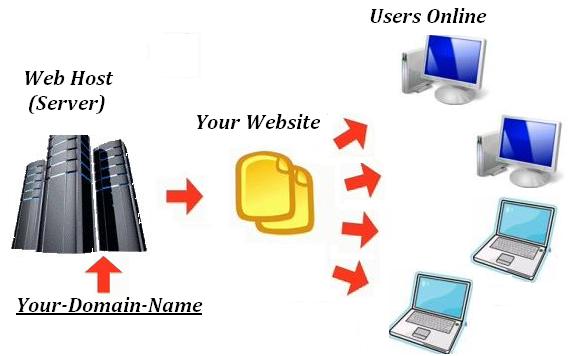
To find right web hosting is quite difficult, because there are many good web hosting providers in today's world such as Hostgator, DreamHost and BlueHost. Every web publisher are trying to find good service provider because we pay them to host our site. There are many things that are keep in mind before buying any web hosting service, such as how much big your organization, and how much space you required to host your site, and also check uptime of that site because it is important, if your site is not live then you loose many customers/visitors. So before buying/purchasing any web hosting keep following suggestion in mind.


Web hosting features requirement

This is probably the most important consideration to start finding a host for your site. You need to decide the technical requirements for your website, this including:
  • Server platform and hardware requirements
If you plan to set up a website that uses programming environments such as Active Server Pages (ASP), Visual Basic scripts, Cold Fusion or Microsoft Access or Microsoft SQL database, in this case, you will need to find a web hosting service that supports Windows platform such as Windows NT or Windows 2000 servers.

Likewise, if you plan to use programming languages such as Perl, CGI, SSI, PHP or mySQL database, then any web hosting plans that support Unix/Linux platform should be sufficient to meet your hosting requirements. Once you have these server platform and hardware requirements in mind, you can decide the best web hosting plans for your need. For more information, you can read "How to select a web server and server platform?"
  • Disk space & Bandwidth requirement
Here is another technical requirement that you need to consider before selecting a web hosting plan, i.e. disk space and bandwidth. If you intend to publish a website that does not have a lot of contents (meaning, web pages), then the disk space requirement may not be a big concern to you. In general, a disk space with 200MB to 500MB should be enough to meet your hosting requirement. In contrast, if you plan to host a website with enormous amount of graphic pictures, mp3 or video files, then you should consider a web hosting plan that provide huge disk space, for example, 500 MB to 1,000 MB.

Similarly, the bandwidth requirement will depend on your site traffic estimation. Obviously, a website that expect to attract high traffic will consume the monthly bandwidth allowance very fast. If so, you will need to find one web hosting service that offer huge bandwidth with 40 GB to 100 GB per month. Depending upon your website requirement, choosing a web hosting service that provide sufficient amount of disk space and bandwidth is crucial consideration to prevent paying extra costs in the future should you overuse the monthly disk space and bandwidth allowance.
  •  Other hosting features
While the above requirements are utmost important, there are other hosting features that you have to consider too. Can web hosting provider support video clips on your website, if you have? Is the web hosting service compatible with Dreamweaver or FrontPage web authoring tool? Do you plan to set up a virtual store online? Can the host support the e-commerce features without adding extra cost to your monthly payments? On top of that, you may also want to find out the number of email accounts provided, number of FTP accounts, web statistic software (analyze your web traffic), type of control panel supported (manage your web hosting account), database and scripting languages supported and etc.

Reliability and scalability

A first-class web hosting provider offers reliable server uptime and fast Internet connection. You should only choose a web hosting service that guarantee at least 99% server uptime with high-speed Internet backbones using at least OC3 (Optical Carrier) lines (155 Megabits per second) or above instead of T1 or T3 lines. A reliable web hosting provider usually invests heavily on their data center infrastructure with high performance servers, high speed multiple backbones providers with fail-over redundancy, backup power generators and firewall software protection in place to ensure they meet the uptime guarantee specified in the terms of service.

Similarly, you should choose a web hosting service with hardware facilities that designed for scalability, so that they can grow with your business. For example, if you need to increase more disk space, bandwidth or number of mySQL databases, you should be able to upgrade as needed without any problems.

Customer service and support

The last major consideration in choosing a web hosting service is to find a web hosting providers that offers excellent customer service and support. You should always search for a web hosting provider that offers 24 hours a day, 7 days a week technical support that fielded with highly experience technicians, so that any web hosting problems will be resolved within a reasonable amount of time. You may also want to consider to test how responsive is their customer support by sending few inquiry emails to the web hosting provider. In general, any response in less than 24 hours is considered acceptable. It is a sign of poor customer support if they take more than one day to response.

In addition, a web hosting provider with excellent support should also provide multiple support channels, such as toll-free phone support, 24/7 email support, live chat, online knowledgebase, Interactive flash tutorials and FAQ.

Also, good web hosting companies develop a community around their service. The community members help each other to solve a lot of regular issues. Does your web hosting solution provider have anything like that? Tips, if you are planning to get business via organic traffic (SEO), make sure that you have good neighbourhood (other websites in the same space) in the shared hosting space. Or it may hamper your ranking over time.

What is Google Adsense Premium Account

Google Adsense Premium Account Publisher Program is for premium websites that receive more than 6 million search queries or 10 million page views per month. But in the reality Google might approve websites with much less page view stats which meet Google requirements or policies.

If you not have google adsense account then you can get one that by clicking here Google AdSense revenue sharing sites


How to Get Invitation for Google Adsense Premium Account?

Normally, you can’t apply for Google Adsense Premium Account. This privilege is reserved for those who Google find attractive and worth as a partner. Here are the main factors that Google looks for when inviting new Google Adsense Premium Account.
  • Search Queries/Page views

Google looks for Search queries and Page views of a websites that have a huge amount of traffic. Overall you need to have a millions of monthly page views to get invited.
  • Adsense/AdWords

If you spend a lot of money on Google AdWord program or earn lot of through Google Adsense then there is more chance to get invited by Google for Google Adsense Premium Account.
  • Website Quality

As we know that quality always matters so website contains quality content and followed by Google terms of services can get invited for Google Adsense Premium Account.
Benefits of Google Adsense Premium Account.
  • Creating direct links to Adsense for search results

Google Adsense TOS do not allow publishers to pre-populate Adsense for search box with keywords or create directs links to Adsense for search page.
  • Adsense for Adult Pages/Casino Gambling

Adsense Publishers are not allowed to display Google Ads on that pages contain adult, pornography, mature, casino or gambling content but Google Adsense Premium Account holder are not limited they can use ads on such pages.
  • Advanced Adsense Ads Customization

Google Adsense Premium Account is not limited by the ad formats provided by Google Adsense. They are free to customize the font, sizes and color schemes of their ad units.
  • Customized Revenue Terms


Normal Google Adsense Publishers have fixed revenue percentage and it’s same for all regular Adsense Publishers. But Google Adsense Premium Account can negotiate the share percentage with Google.
  • Optional Google Adsense Ad labeling

Google Adsense Premium Account has the prerogative to remove the “Ads by Google” or “AdChoices”. They are also not required to mark the units as Ads, as opposed to Adsense’s common policy of marking the units are “Sponsored Links” or “Advertisements”. It helps to increase the click through rate (CTR).
  • Dedicated Account Manager

Google Adsense Premium Account is also assigned a dedicated Google representative who helps optimize the look and feel of their Google Ads for better performance.

So keep posting quality articles on your blog or website to get moer traffic and to receive Google Adsense Premium Account invitation.

Thursday, August 29, 2013

How to add Image or Photo to Facebook Comment

Have you notice earlier that facebook comments have image in it. And its look pretty cool to comment using image, but many peoples are still using old smiles to show reactions. But now onwards you can add your own image or photo to facebook comment, to do so many people are start searching to find out how add image or photo to facebook comment. So your search is stopped here, because here is methods to add image or photo to facebook comment. Well this is not any trick or hack, however this is a new facebook feature to add image to facebook comment.


Facebook allows you to easily post photos in several places, such as in albums, in messages and on walls. However, posting a photo in a comment is a little more complicated. There are two different methods to upload image in facebook comment.

Steps to add Image or Photo to Facebook Comment:

There are two different methods using which you can able to add image in facebook comment.

Method 1:
  1. Login to your facebook account.
  2. Then go to any post and click on comment link.
  3. Then you will see text field to add comment, and in same line at right corner you will see camera icon like below image.


  4. Click on that icon to upload photo.
  5. when photo uploaded, hit enter button.
  6. that.s all you will see that photo in comment section.
Method 2: 
  1. Upload your photo to a photo-sharing website. These sites provide unique link addresses for each photo you upload. Try sites such as Image Shack, Photo Bucket, Flickr and Image Venue.
  2. Click on your uploaded photo. Highlight and copy the link from the address bar at the top of your browser window.
  3. Log in to Facebook. Click on the post on which you would like to comment.  
  4. Type the code "<img src=http://yourphotolinkhere.com>" (without quotes) in the comment field. Paste the full Web address of the photo you would like to post in the comment to replace "http://yourphotolinkhere.com" Press "Enter," or click on the "Send" button under your comment.  
  5. Refresh your browser window to see your photo under the post's comments.
  6. Using this method you can also add animated image (.gif file).
Using above methods you can add following things in facebook comment:
  1. You can comment with text only. 
  2. You can comment with a photo or image only. 
  3. You can comment with both a text and a photo or image.
That's all now amaze your friend by adding images in facebook comments.


The Web Hosting Market - Too compelling to Leave out!

Ever since web hosting has emerged as the most popular form of hosting, industry giants jumped into the competition for gaining monopoly over this sector. The most compelling dimension of the web hosting market is that it allows individuals, organizations and institutions to make their own website. With the internet said to be the fastest growing sector in the history of business, the web hosting industry has experienced a massive expansion in just a few years.

With the potential of entrepreneurship and opening up a new company with minimal investment, web hosting is considered to be the ultimate start-up business, allowing small hosts to stand up in-front of IT sector giants. The age old notion that a wider net catches more customers is obsolete now. In-fact the emphasis has shifted to focusing on the right areas, rather than having a wider net. This is what makes people buy web hosting services in general.

As more and more people are moving forward to buy web hosting services, companies have started to give out attractive offers in terms of disk space and bandwidth, to optimize their sales. There can be various types of web hosting companies. The main classification is the free web site hosting and the paid web site hosting services.

Now choosing which web hosting service to go for, and buy hosting services, happens to be the real daunting task. In case of free web hosting services, the user has the right to upload his or her web site content on the server space that is provided by the web hosting company without any cost. Free web hosting services is more lucrative for individual users. On the contrary, paid web site hosting services are best suited for professional web site owners, big organizations and institutions.

There are a few shortcomings in using the free web hosting services. When using the free web site hosting service, you are forced to place the ads and banners by the web site hosting company on your web pages while the revenue collected from that advertisement goes to the company. Hence people opt to but web hosting services instead of using the free services. The advantages of buying web hosting services is that ads and banners placed on your web site are according to your will and the revenue of the banners and ads placed on your web site goes in your pocket. Also in some case of free web site hosting, the domain name of your web site starts with the web site hosting company name followed by your web site name. This is not the case of paid web site hosting service. You get a unique web site domain. The web space provided by free web site hosting service is limited whereas in case of paid web site hosting service you can buy the web space according to your requirements.

Having said the pros and cons, paid web hosting services emerges as a growing sector with a promising future. More and more people are inclined to buy web hosting services at the end of the day.

Wednesday, August 28, 2013

How to Unlist your number from Truecaller App

Truecaller is a App which synchronizes your mobile contact number with truecaller database, and unnecessary sharing with world. Using this truecaller app any one can easily get your details by searching your number. And it is so annoying. So basically this app includes phones number captured from every device it interacts so making a social bond between people who just have a number but do not know the name, so this app can help them out. But still this app is regarded as a privacy breached and some people might want to remove or unlist their phone number from this app or website.

So we can  use official method to remove your number from truecaller app to do not show your phone number to anyone and completely unlist it out from truecaller. Well yes obviously the company that creates this kind of website or app has a mandatory rule to include some possibility through which anyone can get rid of their application.

Follow methods to Unlist your number from Truecaller App:

  1. Open Truecaller unlist page by clicking here.


  2. Now you will see page something like above, just choose your Country and then enter your phone number.
  3. Now you need to enter the Captcha code as mentioned and then you need to click that Mail kind of icon.


  4. That's it now you will see that Successful message like above so that means your number has been unlisted or removed from Truecaller.
  5. So now it might take like 24 hours for getting fully unlisted so you might have to wait.
Note: Once you remove/unlist your phone number cannot be added later again.