Thursday, June 27, 2013

How to Increase the Battery Life for Android Phones

Android is todays most popular mobile os. And many users have android phone, but most of people have complain about battery life. As we know android phone have many functions so it consumes more battery. But i will tell you that how to increase the battery life for your android phone. To increase battery life you need to make some tweaks to your phone, here i will tell you how to do that,


Most of the higher end android mobile have chipset that uses high frequency and sucks lot of battery. Before understanding ways to increase the battery life for android phone, you should understand what drains your android battery.
Settings –> About Phone –> Battery –> Batter Use

Here are 10 easiest ways to save your battery life.

1.    Exit application
Application running in background is a battery killer. Make sure you exit an application by pressing exit button or back button and not home button. Pressing the home button will leave the recently opened application to run in the background and it sucks the battery juice.

2.    Force Close

Do not install apps that suck battery lot. Stop the application that eat battery power.
Settings –> Applications –> Running Services –> Click the application –> Stop the application
Though you close an application by pressing back button, it may still run in the background. You need to force close it in order to save the battery life.

3.    Avoid live wallpaper


Live wallpapers runs in background every time you unlock your mobile. If you need to save your battery you need to compromise on not using the animated wallpapers. Do not download any application of animated wallpapers as well.
Settings –> Display  –> Wallpapers –> Disable Animation/live wallpaper

4. Wifi, bluetooth and GPS


Use wifi, bluetooth and GPS only when it required.
Settings –> Wireless and Networks –> Wi-Fi settings / Bluetooth settings. Settings –> Location and Security –> Use GPS satellites.
You can disable battery killers in seconds using these shortcuts.

5.    Disable the background data


Background data give permission to an app to use the mobile data and run in background. Example GTalk will use the mobile data if the background data is enabled and it will show you as online. This background running will kill your battery life.
Settings –> Accounts and Sync Settings –> Disable Background Data.

6.    Screen brightness


Most of battery power is used to light the display. It is necessary to keep optimum brightness to save the battery life. Do not compromise the readability.
Settings –> Display Settings –> Brightness –> Select manually / enable Automatic brightness.

7.    Widgets
These days there are lots of widgets available in the android market. Most of the widgets are live feed which always run in background and kill the battery life. Remove the live feed widgets unless it very much necessary.
Widget –> Press and hold –> delete.

8.    Disable Auto-Sync


If Auto sync is ON, mobile usage peeks when it is connected to mobile data. This will automatically start syncing your accounts which will kill your battery life.
Settings –> Accounts and Sync Settings –> Disable Auto-sync.

9.    Signal Strength
When signal strength is low, the mobile battery will dry soon. Make sure you have good signal strength in your locality.

10.  Automatic Updates


Disable automatic updates will ensure that the update of an application does not happen in the background. This small activity can save your battery life.

Go to play store –> Select the app –> Uncheck the automatic update

As you know, battery life is very important to use your phone to the fullest.  Above 10 simple ways can save you hours and hours of battery life. As you can see these steps aren’t technical and are just general guiding principles that anyone could follow in their day to day life. Do you know any other way to save Android battery life? Let us know in comments.

Basic Website Structure

Developing website structure is one of the first tasks in a new website planning process. Careful organizing website content and creating the website structure sets the foundation for a new website and its future success. Combined with other factors, a website with well-categorized content easily and quickly can obtain a high level of usability, search engine ranking and user trust. Let’s look at the basic website structure.
website-structure

Basic website structure can be mainly divided into two types: hierarchical structure and flat structure. When it comes to the development of serious websites, web designers and SEOs prefer using hierarchical approach in order to further generate navigation links and create site maps. The aim behind the website structure is creating navigation which allows users to get the content they look for easily and quickly. Here are a few of the factors to consider when creating a new website structure:

> Analyze potential target audience needs and expectations
> Create an appealing, organized and easy to navigate Home Page
> Organize website content and pages into categories and sub-categories
> Remember the 3 clicks rule (the visitors should make no more than 3 clicks to get what they are looking for on a website)
> Do not overweight the site pages with distractions and irrelevant information, etc
> Develop the sitemap

website-structure

Website structure should include the following basic web pages:

Home Page
Website Home Page is the first main page visitors view when visit the website. All websites have a Home Page. Home Page is the most vital website page for getting search engine rankings.

About Page
About Page tells the users what the website is all about: website subject, aim, as well as gives information about website authors and founders.

Contacts Page
Any website should generally include various methods of making contact with the website owner, website admin or website developer.

Sitemap
Sitemaps are an essential part of large websites, e-stores and websites with huge content that is hard to reach via the links.

Search
The search tool is an important part of the website navigation structure, as it makes easier for users to find information they want by typing the keywords into the search box. 

Depending on a website type and goal, the website structure can include web pages: Portfolio, Company Story, Blog, News, Links, etc. 

Anyone looking to start a website should first develop well-organized and easy navigable website structure backed with top quality and relevant content.

Wednesday, June 26, 2013

How To Convert PDF File to Word File

PDF Files are generate from Adobe Acrobat softwares, and one of the most popular document type which is used by worldwide users. PDF stands for Portable Document Format, which can be use to represent digital document, and mostly used for office work. As we know we can't edit readable PDF file. So one question always get in mind that how to convert pdf files to word file or word document for editing. So here in this article i will explain you that how to convert PDF Files to Word Files.


Method 1: Convert with Adobe Reader

For this method you need to buy Adobe Acrobat, and then follow below steps,
  • Get paid version of Acrobat.
  • Now open the PDF file that you want to convert in Acrobat.
  • Now click on file menu and just select Save As.
  • Now select the word file format that is doc or docx.
  • That's all, now simply save it.

Method 2: Convert Without Adobe Reader

This method is quite simple. For this you need a website that have theses types of services.  There are lots of website to do this, but I would recommend pdftoword.com
  • First of all go to pdftoword.com
  • At the home page you can see PDF to Word conversion.
  • Now select your PDF file, upload it.
  • After that enter the real email address.
  • Now enter CAPTCHA code.
  • At the end click on Conversion Button.
  • That's All. Now check your mailbox, they will send converted file in mail inbox.
 That's all your PDF file is converted to Word file.

Tuesday, June 25, 2013

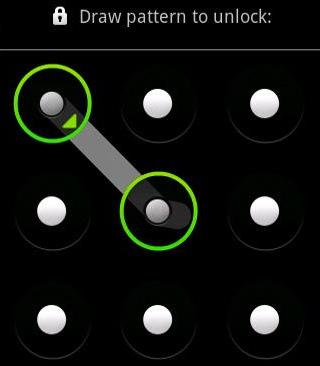
How To Unlock Android Phone Password and Pattern

Android is one of the most popular mobile operating system. Because it is easy to use operating system. And It provides privacy to user by protecting their data by means of password or using patterns. Many android phone users take this advantage to protect their data using password or patterns. Of course everybody remembers their password or pattern that they used to protect data, But what happens when they forget password or pattern.?


If you are one of them who forget your password? then, you are at right place, here in this article i will tell you how to unlock android phone's password or pattern. Follow simple steps to unlock your android phone' password or pattern.
  1. First of all Power Off your device.
  2. After this just press up volume key and hold it.
  3. Now press the power button and hold it.
  4. It will start a secret terminal. 
  5. Then use home button for go up and down.
  6. Then choose option DELETE ALL USER DATA.
  7. It will take some time, and your android phone is unlocked.
That's all, you are successfully unlock your android phone password and pattern.

Note : By using trick you will be loose your phone's user data and all system files are reset to default, use this trick at your own risk.

Monday, June 24, 2013

How to Increase Downloading Speed in BSNL Broadband

As we know BSNL is the Indian government owned telecom company, that provide different services like landlines phones, wireless phones and broadband internet connections.
BSNL broadband internet connection is the most widely used broadband service in India. But many people find the download speed is not upto the mark. If so, BSNL provides an option to upgrade the internet speed by
opting for another plan. Currently BSNL offers bandwidth of upto 8MBPS.
But if you're not interested to upgrade to a new increase the internet speed using some tips, then here are the detailed instructions.

How to Increase Download Speed of BSNL Broadband?
Generally windows reserves 20% of the bandwidth provided by the Internet service providers. So if we can reduce the limit to 0, then we can use the complete bandwidth allocated for us.
  1. Go to Start -> Run
  2. Type "gpedit.msc" to open the group policy editor.
  3. Navigate to "Local Computer Policy" -> "Computer Configuration" -> "Administrative Templates" -> "Network" -> "QOS Packet Scheduler" -> "Limit Reservable Bandwidth."
  4. Now, double-click on the option named "Limit Reservable Bandwidth" and change the value from 20 to 0.
The third-party DNS servers are always better than the default BSNL DNS servers. So changing these can help you increase the download speed of the BSNL broadband.
  1. Go to Start -> Control Panel -> Network and Sharing Center/Network Connections -> Open "Local Area Connection" and click on "Properties" button.
  2. Now click on "TCP/IP" and in the DNS address fields, replace the current DNS servers with the below two addresses.
  3. 208.67.222.222 208.67.220.220
  4. Click "OK" and restart the Internet connection.
That's it! The above tips worked excellently for me to increase my BSNL broadband speed.
Note: Windows 7 Home Edition (64 bit) doesn't have gpedit.msc option. Hence, skip the first step and go with the second option if you're win 7 home user.

Modern Web Design & Development Trends


One of the proven ways to a successful website is keeping in touch with web development and web design trends.

Today, knowing what web users and clients expect from a modern website is more important than ever. Below we outline popular web design and web development trends 2012-2013 based on a professional experience of Woweb team of web developers and designers.


SEO Web Design


SEO Web Design is a must on the modern Web. It covers many on-page and off-page web development and web design techniques, all aimed at increasing website traffic. The creation of unique template, unique content, and intuitive website navigation are a few of many technical and creative approaches applied in SEO web design. 


Social Media & Networking Websites


Social media websites become more popular among clients looking to promote their online business. These are often big Internet portals where people communicate and collaborate with each other, share information, build communities and topic discussions, and find other websites related to a specific niche or interest. To succeed with social media and networking portals, ask for assistance of professional web designers. 


Logo Design


Designing logos for web companies is a hot trend in modern web design. Professionally designed logo can enhance a company’s image or promote a product within the target audience. Professional designers might be the only ones who are able to develop simple, yet distinctive and memorable custom logo designs.


 Infographics


Information graphics or Infographics are visual presentations of information. Creative and attractive infographics allow delivering complex knowledge or boring numbers in the clear and fun way. Infographics require professional design skills and become more and more popular on the modern web.


Unique Web Templates


Using website templates allows setting up websites of any type. Whether you want to create a personal website or business website, website templates can make this task not only easier but also time- and budget-saving. Website templates designs include HTML templates, PSD templates, Flash templates. To choose unique web template, you will need help of experienced web designers.


Website Layout


Website layout design is one of the hottest trends in modern web design. Layout designs can be of any type, from clear and simple to complex and detailed. Developed by professional web designers website layouts can be customized according to client’s project goals. Eye-catching layouts can add to the website a distinctive style and capture the attention of target audience.

For all Web Design and Web Development services, get in touch with our web developers and web designers at WoWEB. We specialize in professional Web Development, Web Programming, Web Design, SEO & Copywriting and other website development services following the latest trends and standards. You can always meet us at Woweb.com!

Sunday, June 23, 2013

Micromax Canvas 4 HD Specification

After huge sales of Micromax Canvas 3D, Micxromax announced their brand new smartphone that is Micromax Canvas 4 HD, which was also known as the Micromax A120 Canvas HD is going to be the next smartphone for India. The company is teasing campaign seems to be setting the bar high, after releasing photos on Facebook and videos on YouTube.
Indian company Micromax is gearing up for one of its biggest releases in a while with the new full HD smartphone, the two teaser Micromax Canvas 4 videos can be watched below, and the photo we are showing below was teased on Facebook with the status reading “Slide, Swipe, Press to unlock. What’s next?”


The photo shown above shows the Micromax Canvas 4 in the middle with the Apple iPhone to its left and a BlackBerry smartphone to its right, this is obviously letting you know that the MC4 HD phone has a push to unlock feature rather than slide to unlock.
Consumers interested in the Micromax Canvas 4 will be able to pre-order from June 28th and the expected price is going to be somewhere around the Rs. 20,000 region.
The Micromax Canvas 4 specifications very much a mystery, but we do know it will feature a full HD touchscreen display, other speculated features are said to include a quad-core/octa-core processor.

We are hoping the Micromax Canvas 4 releases in other countries and not only limited to India, this looks like it will be a stunning smartphone. The Micromax A116 Canvas HD was released back in February 2013 and the Canvas 4 is said to be its successor.